
You run Google Ads for a home service firm, or you manage the person who does. Each Friday someone must say what the money did and what to change. This page is the recipe our agent follows to write that report. It reads the account’s own numbers. It keeps a memory file per client. It lets a second agent try to break the draft before a person sees it.
It is the Google Ads part of the weekly MAA. MAA means Metrics, Analysis, Action. Dennis Yu’s guide to doing MAA explains the habit. This page explains the tool that runs it.
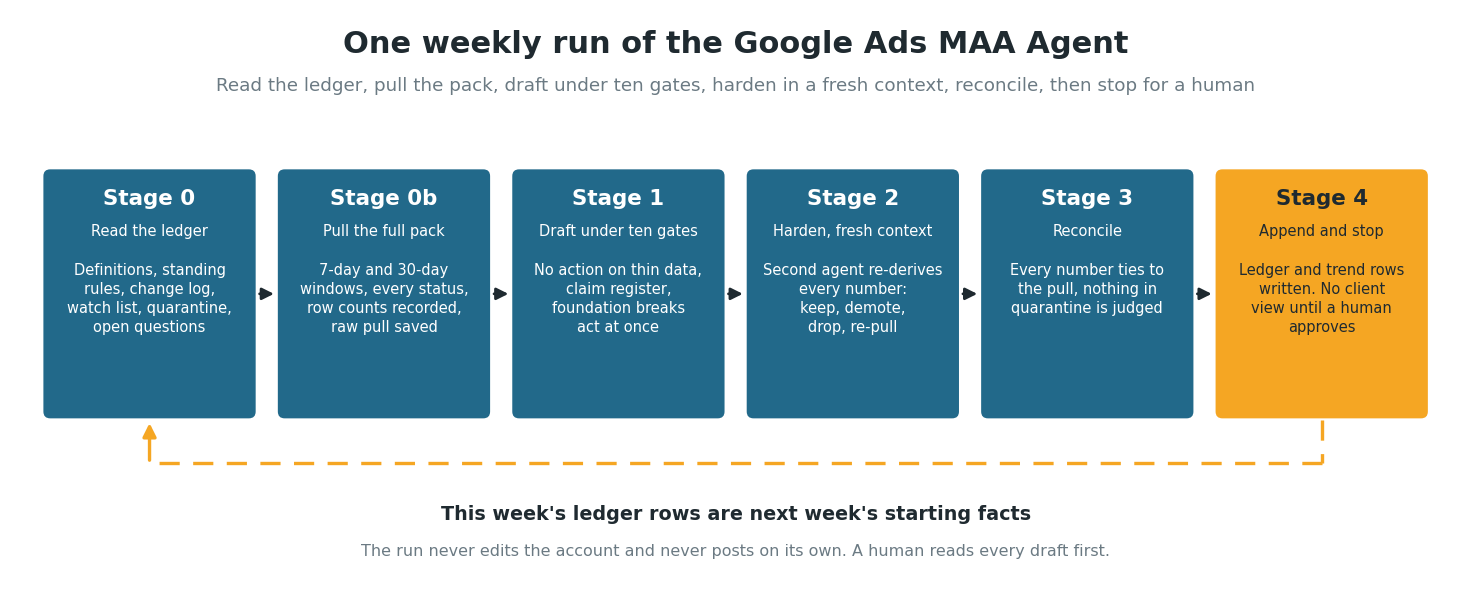
One weekly run: read the ledger, pull the pack, draft under the gates, harden, reconcile, stop. This week’s ledger rows are next week’s starting facts.
A human reviews every draft before the client sees it. Nothing publishes on its own, and nothing changes in the account without a person approving a script. The code is public in the google-ads-maa-skills repository on GitHub, MIT-licensed, with a worked example and the run records listed on this page.
The boundary: read, explain, stage, never edit
The agent reads the account, explains it, and stages the work. It never edits bids or budgets on its own. The data connection is read-only by design. Every change ships as a dry-run-first script that a person approves, and every report stays a draft until a person posts it.
That boundary is deliberate. The value of a weekly MAA is trust. The client sees the same numbers we see, the report names the bad news, and every recommendation traces back to evidence. An AI that quietly edited the account would undercut the trust the report exists to build.
This page uses three terms:
- The ledger is one file per client that holds what we already know: how a lead is defined, the target cost per lead, every change made to the account and when, open questions, and anything too new to judge.
- The gates are ten rules that stop a thin number from becoming an instruction.
- The hardener is a second agent that reads the finished draft cold, with the raw data and the ledger but none of the writer’s reasoning, and tries to break it.
Why the structure matters
Metrics say what the numbers did. Analysis says why. Action says what we do next. Dennis’s core claim is that analysis is 10x more important than metrics. Metrics say the patient’s arm hurts. Analysis is the X-ray that finds the broken bone. Most agency reporting skips the X-ray, which is why the same PDF with the same three bullets shows up every month while CPA sits at $200.
The discipline is the point. The agent makes a recommendation only when it can name the number it moves and the reason it moves that number. Compare “add some negatives” with “add exact match negatives for the competitor brand in the search terms, worth about $140 a week based on 30-day data.” Only the second one is an action.
Since the September 2026 rewrite, the agent also makes no recommendation on fewer than 30 clicks or fewer than 5 conversions, no matter how good the story sounds. A dated rule in the client’s ledger can waive that once, and it has to say why.
The proof: one account, 21 cycles
The account is a local service business in a large metro. It runs two Search campaigns, and one carries nearly all of the spend. We do not name the client here, and the numbers are unchanged. The client’s goal is $50 to $80 per lead, judged on a 90-day basis. The $85 the July version of this page quoted was a legacy target CPA setting, not the client’s goal.
When structured weekly runs started on this account, the 30-day cost per lead was $216.50. Twenty cycles later it reads $86.89:
| Cycle ending | 30-day cost per lead |
|---|---|
| 2026-04-24 | $216.50 |
| 2026-05-01 | $167.83 |
| 2026-05-08 | $179.17 |
| 2026-05-15 | $142.52 |
| 2026-05-22 | $130.57 |
| 2026-05-29 | $136.70 |
| 2026-06-05 | $112.99 |
| 2026-06-12 | $96.52 |
| 2026-06-19 | $77.51 |
| 2026-06-26 | $79.55 |
| 2026-07-03 | $72.45 |
| 2026-07-10 | $68.21 |
| 2026-07-17 | $81.76 |
| 2026-07-24 | $80.09 |
| 2026-08-03 | $81.37 |
| 2026-08-07 | $77.97 |
| 2026-08-14 | $80.15 |
| 2026-08-21 | $74.30 |
| 2026-08-28 | $84.01 |
| 2026-09-04 | $79.32 |
| 2026-09-11 | $86.89 |
Source: the account’s trend.csv, one row per weekly report. One cycle ran three days late, which is why an August 3 row sits between two Fridays.
The 30-day cost per lead fell from $216.50 to $68.21 over the first twelve cycles. In the nine since, it has sat between $74 and $87, oscillating around the top of the client’s band. The monthly view, the resolution we use for this account, shows June at $79.14, July at $77.31, and August at $76.31.
Two moves drove the early gains:
- Dynamic Keyword Insertion on the geo keywords took city-specific Quality Scores from the 2 to 6 range up to 9s and 10s, and impression share lost to rank fell from 30.68% to 11.00%.
- Breaking the account’s highest-spend keyword out of a crowded ad group into its own tightly matched one took it from QS 3 with zero conversions to 3 conversions at $78.84.
From there the weekly loop compounded. We raised the budget only after impression share data proved budget was the constraint. We ran negatives every cycle to keep the new traffic clean. A landing page test running since August 3 stood $15.91 per lead ahead of the control on September 10. As of September 15 we had not yet switched to the winning page, so the test continues as a split.
A disciplined checklist, run week after week, did this. The meta articles near the end of this page document individual runs, one article per run.
How a weekly run works
Since September 2026 the run has five stages. The first stage has two halves, read and then pull, so the headings below run from Stage 0 through Stage 4. Each stage depends on the one before it.
Stage 0: read the ledger before any data
The agent opens the client’s ledger, all ten sections:
- identity and access
- definitions
- standing rules
- change log
- watch list
- open questions
- recent-change quarantine
- render spec
- weekly log
- known data faults
Then it reads the metric spec (which numbers lead the report and in what order) and last week’s report. It pulls nothing yet. This is what separates it from pasting a CSV into a chatbot: no weekly amnesia, and no re-asking the operator what a lead is.
Stage 0b: pull the whole pack
The primary source is the official Google Ads MCP, a read-only bridge to the Google Ads API. The agent runs the full query pack for the 7-day and 30-day windows:
- campaigns and budgets
- keywords with Quality Score components, every status, not only enabled
- search terms
- ads with strength
- conversions by action
- network and device splits
- searcher location
- negatives at all three levels, paged to the end
- call detail
- the change history
It saves the raw pull and records the row count of every query. The agent flags any query that returns exactly its row cap, and it may not call anything “absent” from that dataset.
Stage 1: draft under ten gates
The gates, in plain terms:
- No action on fewer than 30 clicks or fewer than 5 conversions.
- No action on a finding seen for the first time this week.
- The agent neither blames nor credits anything changed in the last 14 days.
- Network and device splits come before any keyword verdict.
- The agent reads spend by day before it quotes an average.
- No absence claim from a query that hit its row cap.
- The agent pulls every status before the draft says something is missing from the account.
- Definitions come from the ledger, not from the data’s labels.
- Every causal or trend sentence carries a dataset reference in a claim register, or the agent deletes it.
- The same bar applies to good news and bad.
Foundation breaks are exempt, and the agent acts on them at once: tracking down, ads disapproved, a campaign not serving, budget capped day after day. Questions only the client can answer go to the ledger’s open questions instead of chat.
Stage 2: harden in a fresh context
The frozen draft, the raw pull, the ledger and the spec go to a second agent that has not seen the writer’s reasoning. It re-derives every number and returns one verdict per finding and per action: keep, demote to watch, drop, or re-pull. One round. The agent writes down anything still contested for the human, with both positions in two lines each.
On the five drafts hardened so far, the hardener has corrected numbers on every one (fifteen on this account’s September 11 draft) and dropped between two and six claims per draft. It has never returned a clean pass, which is the argument for keeping it.
Stage 3: reconcile
Every number ties to the pull. Every action has two cycles of watch-list history or is a foundation break. The agent judges nothing in quarantine. It records any account state the change log does not explain as an unlogged change and an open question, and it does not analyze it.
Stage 4: append and stop
The week’s row goes onto the trend file and the ledger: weekly log, change log, watch-list ages, new questions, new quarantine entries, new data faults. The agent closes or strikes through past ledger lines and never deletes them. The run stops before the client view. A human reads the draft and decides. Only then does the render skill produce the client-facing version with its one-paragraph summary and two 13-week charts.
What the rewrite changed, measured on the same week
Before shipping the five-stage run we re-ran one past week through it: the same account as above, August 28 to September 3, the week a human-assisted run had already reported on September 4. Same account, same window, new process. Every windowed campaign figure tied to the cent against the posted report ($505.40 spent, 39 clicks, 6 leads, $84.36 per lead). The differences were in what the two versions were willing to say.
The posted report had led with a Quality Score “reversal” on the anchor keyword. The new run held it to the watch list: eight clicks a week, first seen that week, and the fresh pull did not reproduce it. Two of the posted report’s six actions fell out as non-actions. One was internal file housekeeping, and one was a watch reading dressed as an action. The 14-day rule removed the hedged claims about a keyword enabled six days earlier.
In the other direction, the fuller data pack settled three things the posted report had carried as open:
- a negative-keyword “gap” that had never existed
- a negatives inventory of 981 and 950 rows where the ledger said “about 190”
- every click in the window coming from a targeted city
The hardener caught one real counting error in the new draft: it had reported three visible clicks on a keyword when the rows showed five. That error alone graded the first draft F, and the corrected draft graded B. Human interventions on the re-run: zero. The human-assisted version of the same week had needed six follow-up data pulls and three passes on one test before it settled.
The rewrite trades confident sentences for checkable ones, each tied to a row in the saved data pull.
How to set it up yourself
Everything in this section lives in the public repository linked in the opening. The 1.5.0 release is what this page describes. Check the changelog for the version on main.
What you’ll need:
- a Google Ads account (or MCC) with read access
- Claude (Cowork or Claude Code)
- for the live data connection: a Google Ads API developer token, a Google Cloud project, and OAuth credentials with the
adwordsscope
Step 1: install the skills
Install the repository as a plugin or copy the folders under skills/ into your Claude skills directory. Nine skills come in the box:
- the analyzer (the quarterback)
- the reviewer (the hardener)
- the onboarding skill
- the daily check
- a copy optimizer
- a change-script builder
- a landing page auditor
- an automation script builder
- the client-view renderer
Step 2: connect the data
Two routes, and the repository’s WALKTHROUGH.md covers both.
- Route A, the Google Ads MCP (recommended). A read-only, live connection to the Google Ads API. The guide at
shared/frameworks/mcp-setup-guide.mdwalks through the credentials, deployment, and verification. This route gets correctly labeled Quality Score components and the full query pack. - Route B, the export script. A Google Ads Script runs inside the account and emails the datasets weekly. A Gmail label routes them to the analyzer. It needs no API credentials, and it keeps a scheduled run alive when the MCP is unreachable. The analyzer never splices the two. It uses one source for the whole week or stops and says so.
Step 3: onboard the account
Say “onboard [client].” The onboarding skill verifies access, scrapes 12 to 24 months of history including paused and removed items, maps the website and landing pages, and works out the real service area three ways:
- what the client says
- what the account targets
- the cities behind the clicks
It packages the questions only the client can answer, then writes the first ledger plus a filled weekly task prompt. This step makes Stage 0 possible. Without a ledger the weekly run stops.
Step 4: schedule the weekly run and the daily check
The weekly prompt runs the five stages in this recipe. The daily check is a separate, exceptions-only sweep for:
- new disapprovals
- campaigns that stopped serving
- budget caps
- conversion actions gone silent
- landing pages that stop resolving
It reports breaks and changes nothing.
Step 5: review, apply, render
Read the draft and the hardener’s verdicts. Run any generated change script in dry-run first, confirm the preview, then run it live. The script writes its own row into the ledger’s change log. Say “render the client view” and deliver the report.
Verify it worked: the draft’s numbers match the Google Ads UI, every action has an owner and either two cycles on the watch list or a foundation break behind it, the notes block holds the hardener’s verdict table and grade, and the ledger carries the week’s rows. The repository’s docs/meta/ folder holds the run records.
The tool improves the way an account manager does
Every rule in the agent came from a run that went wrong or a reviewer’s edit, and the repository’s changelog keeps the record. The September rewrite came from an audit of five live weekly runs on two accounts. It counted about fifty human interventions per week of runs:
- roughly 40% supplying facts the operator already held in memory
- 25% knocking down recommendations built on one week of data
- 15% correcting false findings from capped or filtered queries
- 15% re-explaining render style
- the rest the analyzer contradicting itself across passes
The old draft had no memory and no guardrails. The ledger answers the first two categories, the gates answer the third, the render spec in the ledger answers the fourth, and the hardener catches the rest.
The loop continues after the rewrite. The first scheduled cycle under it, on September 11, changed the recipe in four places that are already in the skill files:
- The agent pastes the hardener’s verdict table and grade into the notes verbatim. Only one of four reports had done so.
- The agent computes summary blocks in the saved data from rows and never types them. A hand-typed one produced four wrong sentences before the hardener caught them.
- The agent pulls historical Quality Score alongside current state. Current state hid eight scored keywords on one account.
- Disapproved sitelinks and images show up only through campaign asset status reasons, so “nothing is disapproved” now has to name the levels it checked.
Where it falls short today
We publish the seams because they are the roadmap.
- Humans still intervene. On the September 11 cycle the operator intervened two to four times per report. He confirmed a form conversion he had already tested, checked removed ad groups in the interface, set the audience and vocabulary for one report, and commissioned the investigation the zero-call meta article describes. Each answer that can be a rule is now a dated standing rule in the ledger. The re-run reached zero. The number to watch is how many cycles it takes the scheduled runs to get there.
- Posting is by hand. Staging the client view into a Basecamp comment box from the automation has not worked reliably. The editor merged headings at a chunk seam on one account, a full attempt on this account ended with “stop trying,” and on another the draft landed in the wrong thread. The agent now produces a paste-ready block and a person pastes it. The review gate was always going to be human. The paste is too, for now.
- Some data is gated. The API lists auction insight metrics as selectable but rejects them on our developer token. We can request that permission. Until then, competitor movement is a UI read the report names as a next step. Google’s search term privacy threshold hides between a third and all of a small campaign’s query spend.
- We do not yet measure run time and cost on the scheduled runs. The July version of this page quoted about 14 agent-minutes and $2 to $4 per run from estimates. The current runs record UNKNOWN until the notes block, which now requires timestamps, has a few weeks of data behind it.
Full automation is the goal, but only of the pipeline. The review gate stays.
Real examples: meta articles from live runs
Each example below is a meta article documenting one specific run: what the agent did, the judgment calls it made, what a human changed, and what it cost versus the manual equivalent. One run, one meta article.
- Zero-call week explained, not escalated (a client run, 2026-09-11, client anonymized, first run under the five-stage process). The account produced one lead and no counted calls in a week. The hardener graded the first draft F and corrected fifteen numbers. The gates held the collapse off the action list, and a same-day investigation found the cause in the data: cost per click had halved to $7.05, and on this account cheap clicks call less often.
- Weekly review that fixed a blind spot (a client run, 2026-07-10, under the earlier process). A dormant ad group only ever converted on leaked intent from the main service. The agent pulled keyword research mid-cycle, found the real demand in untargeted terms, and shipped two dry-run change scripts with a fold-or-keep decision rule. About 14 agent-minutes and $1.95 against roughly an hour to an hour and a half of manual work.
- Painting contractor run, Claude agent (a client run, 2026-07-10, under the earlier process, and the published article names the client, as agreed at the time). Budget-lost impression share doubled, and the agent traced it to a landing page score lifting ad rank across the whole ad group. A keyword-attributed search-term diff flipped the recommendation from “raise budget” to “tighten match first.” About 14 agent-minutes and $3.70.
The origin post for this system, with the initial three-piece setup, is on BlitzMetrics: the weekly audit origin post.
Related frameworks
- MAA, linked in the opening, is the reporting discipline the agent runs. Start there for the reasoning behind every gate.
- GCT: Goals, Content, Targeting defines what each client’s campaigns are supposed to accomplish. The agent reads it before writing a word.
- Digital Plumbing for tracking is the infrastructure underneath. The reports are only as honest as the conversion data, which is why tracking verification precedes bid changes.
- Dollar a Day is the amplification strategy on the content side, measured by the same weekly discipline.
- Inside the Weekly MAA Report is the merged weekly report that stitches SEO, analytics, Search Console, and Google Ads together. This agent feeds its Google Ads row.
Get started
Run it yourself this week. The repository linked in the opening has everything, and script-based setup takes about 20 minutes. Dennis Yu teaches MAA inside the AI Builder Program and works through your own account’s reports with you. To have the agent run on your account with our team reviewing every report, see our Google Ads management service.
Originally published .