
Dennis reported the changelog that proved nothing on 1 August and could not fix it from where he stood. This is what closing it took.
Read this first. If the Task Library dashboard shows a date that looks wrong, open the Actions tab on
Local-Service-Spotlight/task-library, find “Build & deploy Task Library,” and re-run it. Then reload the dashboard and check the date actually moved. A green run and a correct page are two different things — this whole incident is about the gap between them.
Measure what the page was claiming
| Metric | Figure |
|---|---|
| Dates displayed on the page | 2 |
| Of those, dates derived from a build | 1 |
| Entries in the changelog panel | 1 |
| Date of that entry | 10 June |
| Entries the caption promised | one per run |
| Monthly cycles missing from it | 2 |
| Inputs feeding the dashboard’s own date string | 0 |
| Mornings the build itself missed | 0 |
The last row is the one that makes the rest strange. Nothing was broken. The build ran every morning without fail, and the page still told visitors something untrue.
Read the caption that promised a run log
The dashboard carried a changelog panel with a line printed underneath it:
“Every future run appends an entry here. The changelog is the proof of recursion.”
On 1 August the monthly refresh went to append its entry and found the panel held exactly one record, dated 10 June. The thing built to prove the library keeps improving itself had never recorded a single run. Dennis wrote that up the same day in the changelog that proved nothing.
Sitting above that panel was a second date: a hardcoded string reading “July 2026,” in the dashboard markup, with no code path writing to it. It would have read “July 2026” in December, on a page rebuilt every single day.
Neither element ever threw an error, because neither was doing anything. A constant cannot fail. They were decoration shaped like telemetry, and they were the two things on the page a visitor would most reasonably trust.
Understand why nothing ever complained
Here is the part worth carrying into your own work. There were two dates on that page, and one of them was right every single day.
The “Kept current — updated” badge is owned by a daily job that does hold the credentials, and it had been stamping the correct day for weeks. It sat directly above a changelog frozen in June. A visitor reading top to bottom saw a page maintained that morning, then a panel that quietly disagreed, and stopped reading before the disagreement registered.
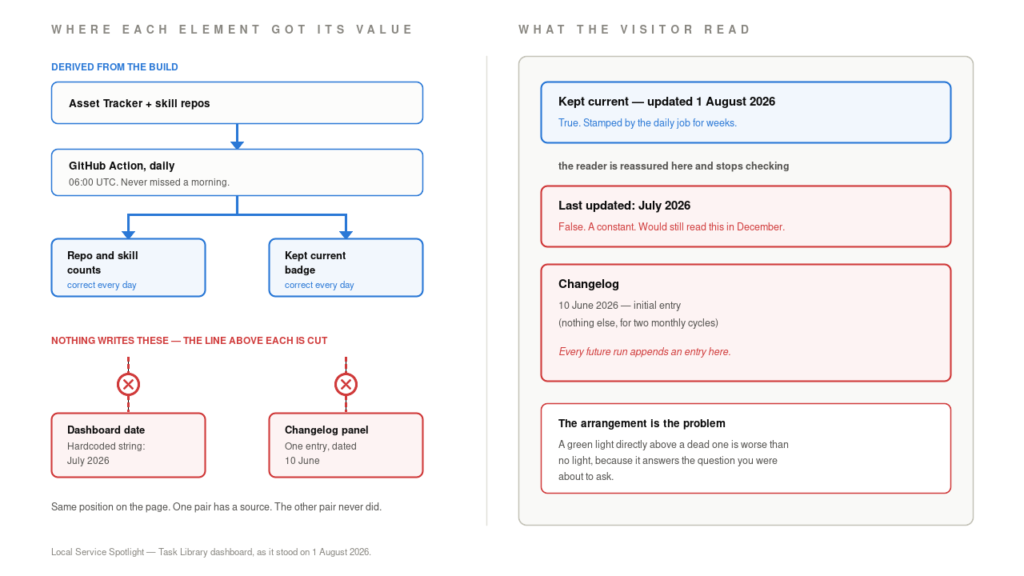
Both pairs look identical on the page. Only one pair has anything behind it. Dennis put the principle better than I can: a green light next to a dead one is worse than no light, because it answers the question you were about to ask.
Separate applied from verified
Somebody wrote a date on a page and nobody asked where the date came from. A caption promised an entry per run and nobody compared the entries against the run history. Both were applied. Neither was ever verified.
Our intake form had the same disease in a different costume. It returned a success message on submissions the server dropped for missing required fields, so the visitor saw a green check and the lead never existed. That is the same shape as a Google Business Profile edited without anyone being told — the system is fine, the reporting is fine, and the two have quietly stopped describing each other.
Applied means you did the thing. Verified means something independent of you looked at the result and agreed. Anywhere those two states can drift apart without producing a signal, they will.
Dennis had already named the fix and could not reach it. His words on 1 August: the panel belongs on the WordPress page we already own, which needs no new credential and ends the dependency for good. Both dates now behave. The dashboard’s own line stamps the real build date, and the provenance panel moved to the page where the publishing job can actually write to it. Two copies writing to one surface is a conflict waiting to happen, so there is now one.
Follow the build from trigger to page
The whole thing is one workflow, .github/workflows/build.yml, in Local-Service-Spotlight/task-library. Three things start it:
| Trigger | When | Why it exists |
|---|---|---|
push to main | Any commit | Content and code changes go live immediately |
schedule | 06:00 UTC daily | Picks up external skill repos and Asset Tracker edits made outside the repo |
workflow_dispatch | On demand | The button you press at 4am |
Four steps run in order, and each fails differently:
- Fetch the Asset Tracker CSV. Pulls the sheet’s published-to-web export using the
TRACKER_CSV_URLsecret. An empty secret logs a line and carries on without the sheet, by design — a missing tracker degrades the build rather than stopping it. The check happens in the shell rather than a step-levelif:, because a secret is not reliably available to anifexpression. - Build
data.json.build/build.pyreads the repo, the skill registry and the tracker CSV, and writes the data the page renders from.SKILLS_READ_TOKENis only needed for private external repos. - Build the pack zips.
build/build-packs.pygenerates the downloadable packs, so counts derive from each pack’s own manifest rather than a number somebody typed. - Upload and deploy. The
dashboard/directory becomes the Pages artifact, and a separatedeployjob publishes it.
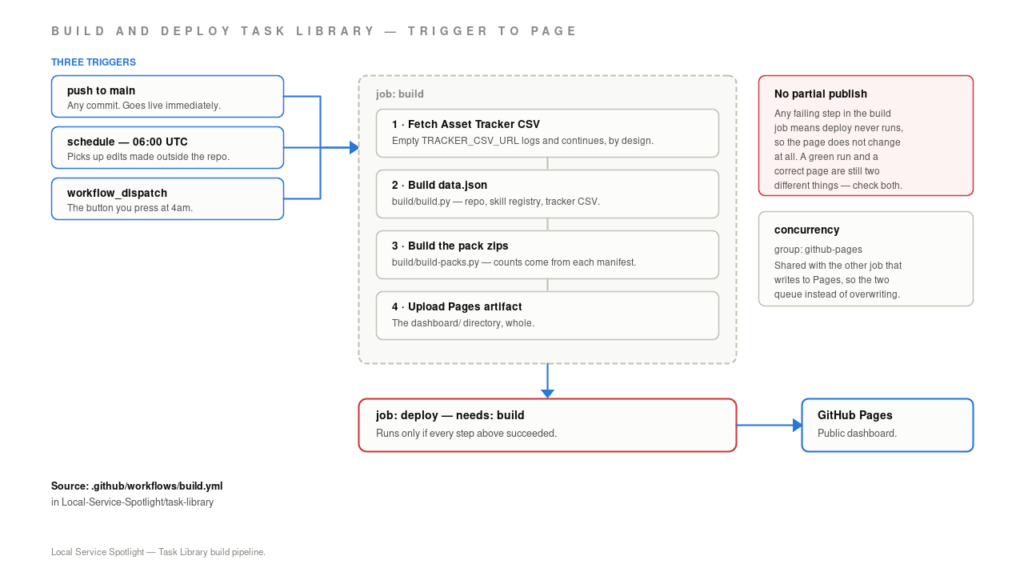
Three triggers, four steps, one gate. The deploy job runs only if everything above it succeeded.
There is no partial publish. The
deployjob declaresneeds: build, so any failure in the build job means the page does not change at all. The workflow also sits in agithub-pagesconcurrency group shared with the other job that writes to Pages, so the two queue rather than overwrite each other.
Fix it at 4am
Work the list in order and stop when the symptom matches.
| Symptom | First check | What to do |
|---|---|---|
| Dashboard shows a date that looks wrong | Actions → “Build & deploy Task Library” | Re-run it. If the run is green and the date still has not moved, something has regressed to a constant — look at the build output, not the workflow |
| Build fails on “Fetch Asset Tracker CSV” | Whether TRACKER_CSV_URL is set | An empty secret is not fatal by design and logs a line. A curl failure is different — check the sheet is still published to web |
| Build fails pulling a skill repo | Run log for a 429 | A cached copy covers google-ads-analyzer as of commit 455a264. Other external repos have no cache yet |
| Build is green but the page did not change | Whether the deploy job ran | deploy needs build. Also check the github-pages concurrency group — another workflow shares it and queues behind this one |
Two rules for whoever is holding it:
- Read the run log before changing anything. Each step names what it was doing when it failed.
- A green run is not a correct page. Open the dashboard and confirm the date moved. That is the entire lesson of this incident, and it is the step that was missing for two months.
Escalation: repository and Actions questions come to me. Org settings, seats and secrets go to Dennis.
Act on this before Friday
Find your own hardcoded labels. Open anything you publish that displays a date, a count, or a status. Trace each one back to the code that writes it. If you cannot find that code in under a minute, you have a “July 2026” of your own.
Then look for a working signal sitting next to a dead one. That is the dangerous arrangement, and it is common. A correct badge above a frozen panel does not just fail to warn anyone — it actively reassures them. Check whether every status element on a page has an owner, and delete the ones that do not.
And write the check that would have caught it. Not more alerts. A test that fails when the date stops moving. The same discipline that keeps redirects from rotting quietly is exactly what this is.
Daniel Goodrich builds the tracking, analytics and automation behind local service marketing at Local Service Spotlight — GTM containers, GA4 events, call tracking, and the pipelines that carry a lead from ad click to reported revenue. He writes about the plumbing most agencies never look at. localservicespotlight.com
Drafted with an agent from the incident log, the build workflow and the 1 August writeup. Facts verified and published by Daniel Goodrich on 18 August 2026.
Originally published .