
Wikidata is the most direct lever you can pull yourself to earn a Google Knowledge Panel — and almost nobody uses it. Unlike Wikipedia, you don’t need an editor to bless you. You can create a structured entity for yourself today, and it feeds the same Knowledge Graph that powers the panel on the right side of Google.
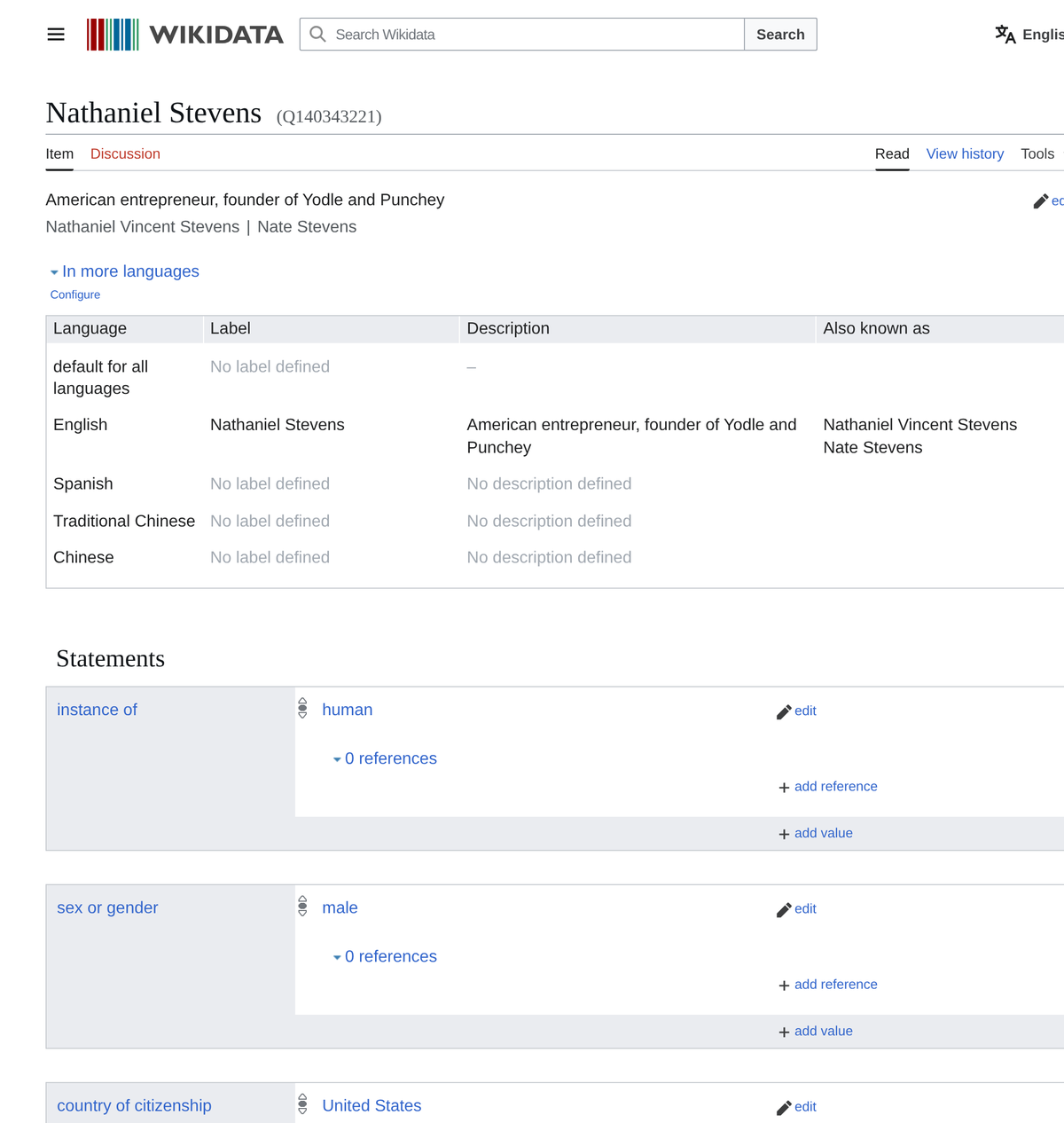
This is the how-to. We’ll use a real item we built — Nathaniel Stevens, Q140343221 — as the worked example so you can see exactly what “done” looks like.
What Wikidata is: a free, open, machine-readable database of entities (people, companies, things) that Google, Bing, and AI assistants read directly. A clean Wikidata item gives Google a structured, sourced description of who you are — one of the strongest signals that you’re a real, distinct entity worthy of a panel.
Why Wikidata matters for a Knowledge Panel
A Knowledge Panel is Google’s display of an entity it’s confident about in its Knowledge Graph. Wikidata is one of the most reliable feeders into that graph because it’s structured (every fact is a typed statement, not prose) and openly licensed. Three reasons it punches above its weight:
- You can do it yourself. Wikipedia requires notability that meets an editor’s judgment. Wikidata’s bar is lower: a clearly identifiable entity describable with serious, public references.
- It’s the disambiguation backbone. Wikidata assigns you a unique Q-ID and lets you state exactly how you differ from same-named people — the cleanest way to win a crowded name.
- It connects your whole identity. Through identifiers and your official website, Wikidata ties your LinkedIn, Crunchbase, and entity home into one machine-readable node.
It’s not a magic button — a panel still depends on the full picture (entity home, consistent signals, authoritative coverage, all scored on the 100-point Personal Brand Score). But of all those levers, Wikidata is the one you can most directly build yourself.
Before you start: the notability check
Wikidata items must describe a “clearly identifiable entity” that can be described using serious, publicly available references. For a person, that usually means independent coverage: press, a notable company, an acquisition, SEC filings, books, major podcasts, an existing profile on an authoritative database. If the only source for you is your own website, hold off and build third-party coverage first — unsourced self-promotional items get deleted.
Example that clears the bar: our worked-example founder has a ~$342M company acquisition covered by business press and SEC filings, a second founded company, and a Crunchbase profile. That’s plenty of “serious, public references” to anchor an item.
Step by step: build your Wikidata item
1. Make sure you don’t already have one
Search Wikidata for your name first. You may already have a thin item (or a duplicate) that just needs improving. Creating a second item for the same person causes exactly the split-signal problem you’re trying to avoid.
2. Create the item — label, description, aliases
Use Special:NewItem. Set:
- Label: the name people actually search (“Nathaniel Stevens”).
- Description: a short, distinguishing phrase (“American entrepreneur, founder of Yodle and Punchey”). This is what disambiguates you in search dropdowns.
- Aliases: your full legal name and any nicknames (“Nathaniel Vincent Stevens,” “Nate Stevens”). This is the correct home for a middle name — as an alias, not a rebrand of your public identity.
3. Add the core statements
Statements are typed facts using property IDs (P…) and item IDs (Q…). The backbone set for a person:
instance of (P31) → human (Q5)occupation (P106) → entrepreneur (Q131524), businessperson (Q43845)country of citizenship (P27) → United States (Q30)date of birth (P569) → your DOBeducated at (P69) → your universityofficial website (P856) → your entity home (yourname.com)
4. Add identifiers — reconciliation gold
External-ID properties are how Wikidata (and Google) fuse your profiles into one entity. Add every one that applies: Crunchbase person ID (P2087), LinkedIn, X/Twitter, IMDb ID, ORCID, company registries. Each identifier is a thread tying a separate profile to your single Q-ID.
5. Reference every claim
Each statement should carry a source (the “references” section under it), ideally a third-party URL — a press article, the company’s filing, an authoritative profile. Referenced items are far more durable and far more trusted by Google. Unreferenced biographical claims invite deletion.
6. Separate yourself from namesakes with “different from”
If other people share your name and have their own items, add different from (P1889) pointing at each of them. This is the single most powerful disambiguation statement on Wikidata — it tells the Knowledge Graph, explicitly, “this entity is not that one.”
7. Close the loop with your entity home
Two-way linking seals it: your Wikidata item’s official website (P856) points to your site, and your site’s Person schema lists your Wikidata URL in its sameAs array. Now Google can round-trip between the two and treat them as the same entity.
Worked example: Nathaniel Stevens (Q140343221)
Here’s the exact item we built, so you can copy the pattern:
- Label / description / aliases: “Nathaniel Stevens” / “American entrepreneur, founder of Yodle and Punchey” / “Nathaniel Vincent Stevens,” “Nate Stevens.”
- Statements: human; entrepreneur + businessperson; U.S. citizen; date of birth; educated at the University of Pennsylvania; official website nathanielstevens.com; Crunchbase ID.
- References: the occupation and education claims cite independent business-press coverage of the Yodle acquisition.
- different from (P1889): two links — one to the academic researcher of the same name, one to a 19th-century namesake — so Google won’t blend them.
- sameAs loop: the item links to his entity home, and his entity home’s Person schema now lists
wikidata.org/wiki/Q140343221insameAs.
That’s a complete, defensible, panel-ready entity — built in one sitting.
✓ DO
- Reference every biographical claim with a real source.
- Add identifiers and the sameAs loop to your entity home.
- Use “different from” for every namesake with an item.
✗ DON’T
- Create an unsourced, promotional item — it gets deleted.
- Make a second item if one already exists (split signal).
- Inflate or fabricate facts — Wikidata is heavily patrolled.
After you publish the item
Wikidata won’t produce a panel overnight. Google ingests it on its own schedule, and the panel still depends on your other signals lining up. Reinforce it: keep your entity home, LinkedIn, and Crunchbase consistent with the item; earn coverage that repeats the same facts; and treat Wikidata as one strong input among the full set of Knowledge Panel requirements.
Keep going — the rest of the name & panel playbook
→ Should You Add a Middle Initial to Get a Knowledge Panel?
→ How to Get a Knowledge Panel When Many People Share Your Name
→ Who is eligible for a Wikidata page?
Want your Wikidata item and entity home built for you?
We build complete, referenced, panel-ready entities — Wikidata, Person schema, the sameAs loop, and the surrounding signals — scored against a 100-point rubric. Get your Knowledge Panel done-for-you.
Keep the loop closed — and re-check on a schedule
Creating the item is the start, not the finish. Two things keep a Wikidata item working: the loop and the maintenance. The loop means the item points to the person’s site (the official-website statement, P856) and the site’s Person schema points back to the item (a sameAs to the Wikidata URL) — Google trusts an entity far more when both directions agree. The maintenance means re-checking on a schedule: items get edited, merged, or occasionally vandalized; descriptions drift; and new references appear that strengthen the item. We re-verify the whole fleet weekly and add references as coverage grows. Set it once and forget it, and you’ll eventually find the item out of date — or gone.
FAQ
Does a Wikidata item guarantee a Google Knowledge Panel?
No. Wikidata is one of the strongest signals you can build yourself, but a panel also depends on an entity home, consistent identity signals, and authoritative coverage. Wikidata makes you a structured, referenced entity in Google’s Knowledge Graph — a major step, not a guarantee.
Can I create my own Wikidata item?
Yes. Unlike Wikipedia, Wikidata lets you create an item yourself, provided the entity is clearly identifiable and supported by serious, publicly available references. Avoid promotional or unreferenced items — they get deleted.
What is the “different from” property and why does it matter?
“Different from” (P1889) is a Wikidata statement that explicitly links your item to same-named people’s items to say you are not them. It’s the cleanest way to disambiguate a common name so Google attaches the right panel to the right person.
How do I connect Wikidata to my website?
Set your item’s official website (P856) to your entity home, and add your Wikidata URL to the sameAs array of your site’s Person schema. This two-way link lets Google round-trip between the two and treat them as the same entity.
Rather not wrangle Wikidata yourself? Our done-for-you Google Knowledge Panel package handles the entire entity-building process — and we don’t stop until your panel is live.
Originally published .